Elastic Beanstalk
- A service for deploying and scaling web applications and services
- Can quickly deploy and manage applications in the AWS Cloud without having to learn about the infrastructure that runs those applications
- Reduces management complexity without restricting choice or control
- Automatically handles capacity provisioning, load balancing, scaling, application health monitoring, instance configuration
- Go, Java, .NET, Node.js, PHP, Python 및 Ruby에서 개발된 애플리케이션을 지원
- Builds the selected supported platform version and provisions one or more AWS resources, such as Amazon EC2 instances, to run your application
- Can interact with Elastic Beanstalk by using Elastic Beanstalk console, AWS CLI, eb, high-level CLI designed specifically for Elastic Beanstalk
- To use Elastic Beanstalk
- create an application
- upload application version in the form of an application source bundle
- provide some information about the application
- Then, Elastic Beanstalk automatically launches an environment and creates and configures the AWS resources needed to run the code
- After environment is launched
- can manage environment and deploy new application versions
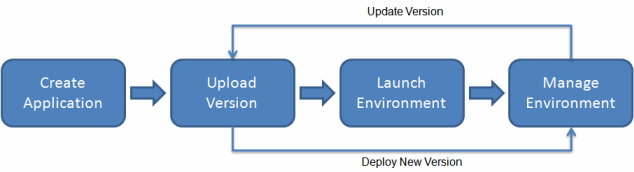
- After create and deploy application
- information about the application (metrics, events, and environment status) is available throught Elastic Beanstalk console, APIs or Command Line Interfaces including the unified AWS CLI
Elastic Beanstalk Application
- a logical collection of Elastic Beanstalk components, including environments, versions and environment configurations
- In Elastic Beanstalk, an application is conceptually similar to a folder
Elastic Beanstalk Application version
- refers to a specific, labeled iteration of deployable code for a web application
Elastic Beanstalk Environment
- a collection of AWS resources running an application version
- runs only one application version at a time
- but, you can run the same application version or different application versions in many environments simulatenously
- when you create an environment, Elastic Beanstalk provisions the resources needed to run the application version you specified
Elastic Beanstalk Environment Tier
- you have to choose an environment tier
- environment tier designates the type of application that the environment runs, and determines what resources Elastic Beanstalk provisions to suppor it
- An application that serves HTTP requests runs in a web server environment tier
- A backend environment that pulls tasks from an Amazon Simple Queue Service queue runs in a worker environment tier
Pricing
- no additional charge for Elastic Beanstalk
- pay only for the underlying AWS resources
'aws' 카테고리의 다른 글
| CloudFront & Global Accelerator (3) | 2024.03.29 |
|---|---|
| Route 53 (1) | 2024.03.28 |
| RDS (1) | 2024.03.27 |
| High Availability & Scalability (1) | 2024.03.25 |
| EC2 Instance Storage (0) | 2024.03.24 |