Amazon RDS Overview
- RDS : Relational Database Service
- is a managed service :
- automated provisioning, OS patching
- continuous backups and restore to specific timestamp
- monitoring database
- read replicas for improved read performance
- multi AZ setup for Disaster Recovery
- maintenance windows for upgrades
- scaling capability (vertical and horizontal)
- storage backed up by EBS
- but can't ssh into instances
RDS - Storage Auto Scaling
- helps to increase storge on RDS DB instance dyanamically
- when rds detects you are running out of free database storage, it scales automatically
- set maximum storage threshold
- automatically modify storage if
- free storage is less than 10% of allocated storage
- low-storage lasts at least 5 mins
- 6 hrs have passed since last modification
- automatically modify storage if
- useful for applications with unpredictable workloads
RDS Read Replicas for read scalability
- Up to 15 Read Replicas
- Within AZ, Cross AZ, or Cross Region
- Replication is ASYNC, so reads are eventually consistent
- Replicas can be promoted to their own DB
- Applications must update the connection string to leverage read replicas
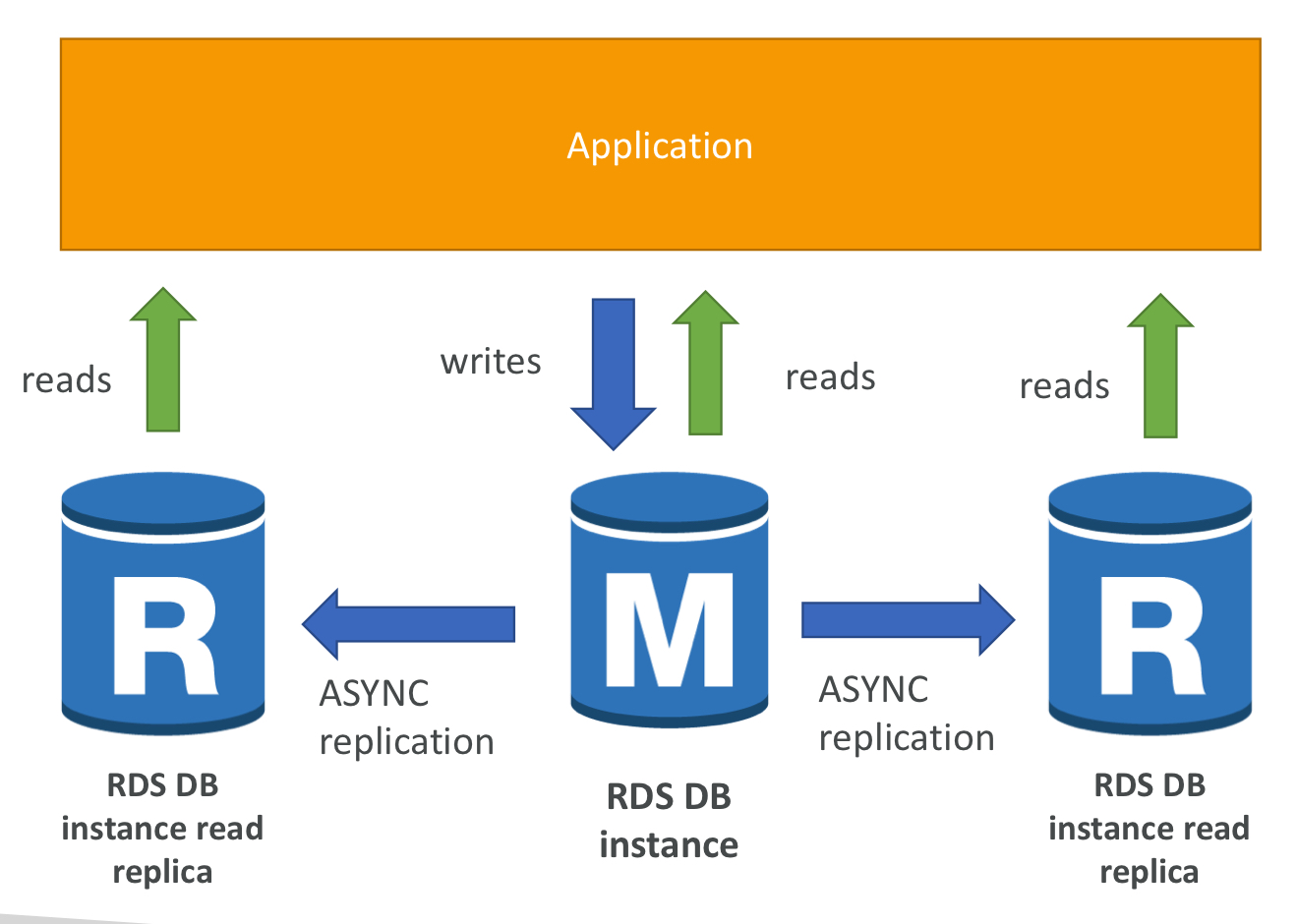
- Read replicas are used for SELECT (= read) only kind of statements

RDS Read Replicas - Network Cost
- In AWS there's a network cost when data goes from one AZ to another
- For RDS Read Replicas within the same region, you don't pay that fee
RDS Multi AZ (Disaster Recovery)
- SYNC replication
- One DNS name - automatic app failover to standby
- Increase availability
- Failover in case of loss of AZ, loss of network, instance or stroage failure
- No manual intervention in apps
- Not used for scaling
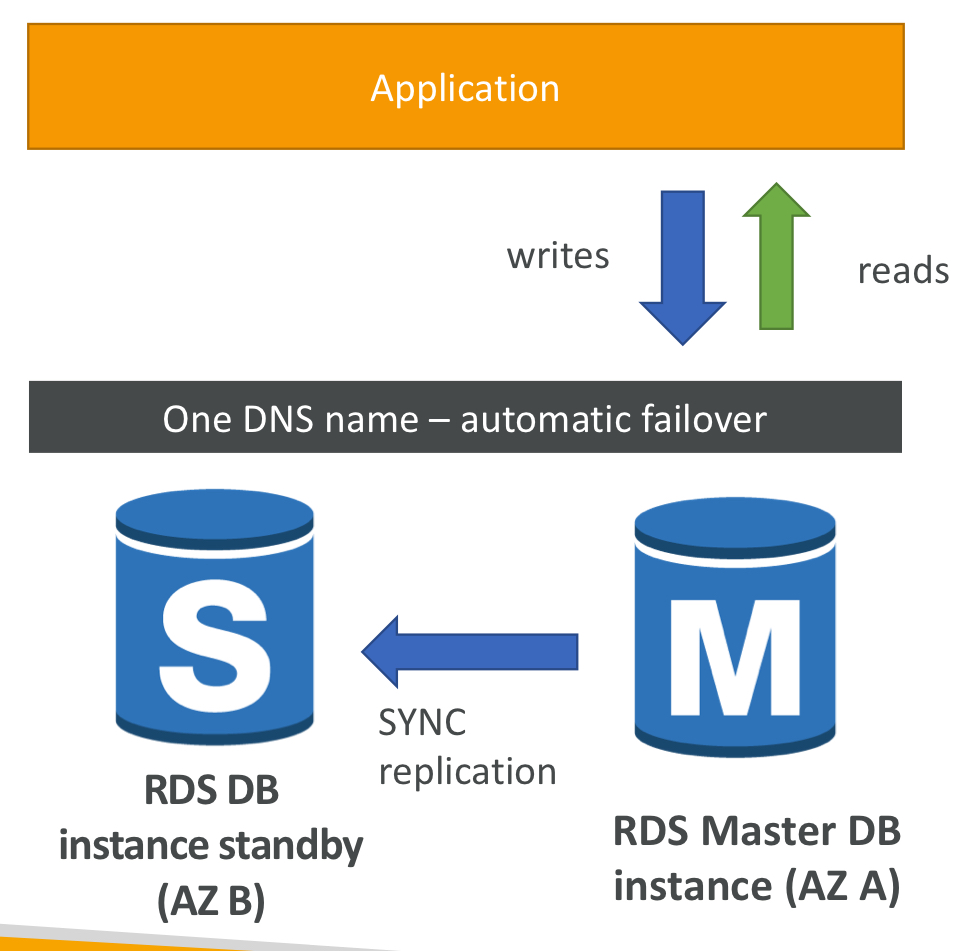
RDS - From Single-AZ to Multi-AZ
- Zero downtime operation ( no need to stop the DB )
- A snapshot is taken
- A new DB is restored from the snapshot in a new AZ
- Synchronization is established between the two databases
RDS Custom
- Access to the underlying database and OS so you can
- Configure settings
- Install patches
- Enable native features
- Access the underlying EC2 Instance using SSH or SSM (AWS에서 인프라를 보고 제어하기 위해 사용할 수 있는 AWS 서비스)
- De-active Automation Mode to perform customization, better to take a DB snapshot before
RDS Backups
- Automated backups :
- Daily full backup of database
- Transaction logs are backed-up by RDS every 5 mins
- 1 to 35 days of retention, set 0 to disable automated backups
- Manual DB Snapshots
- Manually triggered by the user
- Retention of backup for as long as you want
Amazon Aurora
- proprietary technology from AWS
- Postgre and MySQL, supported as Aurora DB
- AWS cloud optimized, 5 x performance improvement over MySQL on RDS and 3 x performance improvement of Postgre on RDS
- automatically grows in increments of 10GB, up to 128 TB
- can have up to 15 replicas and the replication process is faster than MySQL
- Failover in Aurora is instantaneous, High Availability native
- costs more than RDS about 20%, but more efficient
Aurora High Availability and Read Scaling
- 6 copies of data cross 3 ZA
- one aurora instance takes writes(master)
- automated failover for master in less than 30 seconds
- Master + up to 15 Aurora Read Replicas serve reads
- Support for Cross Region Replication
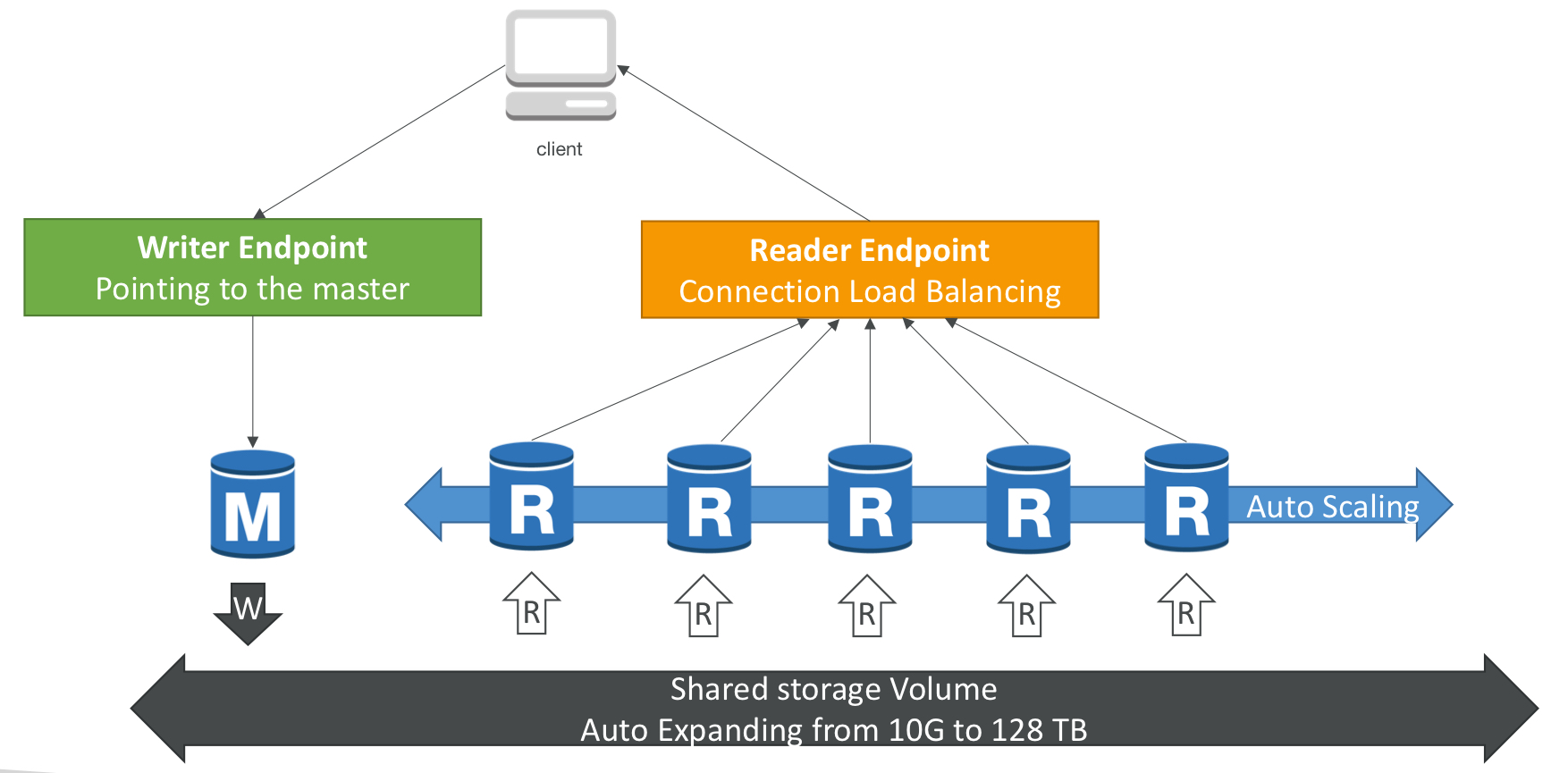
Features of Aurora
- Automatic fail-over
- Backup and Recovery
- Isolation and security
- Industry compliance
- Push-button scaling
- Automated Patching with Zero Downtime
- Advanced Monitoring
- Routine Maintenance
- Backtrack : restore data at any point of time without using backups
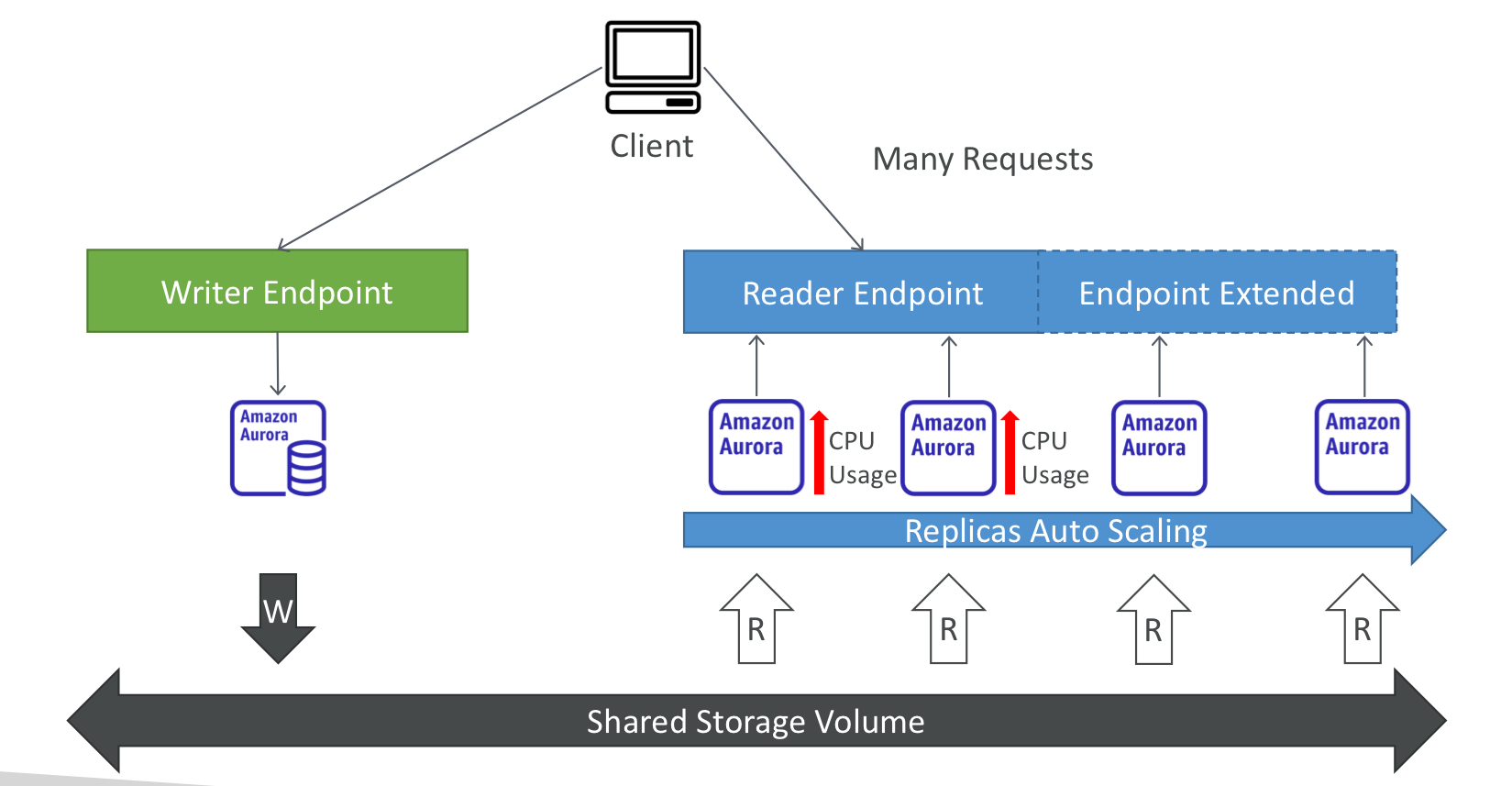
Aurora - Custom Endpoints
- define a subset of Aurora Instance as a custom endpoint
- run analytical queries on specific replicas
- the reader endpoint is generally not used after defining Custom Endpoints

Aurora Serverless
- Automated database instantiation and autoscaling based on actual usage
- Good fro infrequent, intermittent or unpredictable workloads
- No capacity planning needed
- Pay per second, can be more cost-effective'
Global Aurora
- Aurora Cross Region Read Replicas:
- Useful for disaster recovery
- Simple to put in place
- Aurora Global Database :
- 1 Primary Region (read/write)
- Up to 5 secondary (read-only) regions, replication lag is less than 1 second
- Up to 16 Read Replicas per secondary region
- Helps for decreasing latency
- Promoting another region(for disaster recovery) has an RTO of < 1 min
- Typical cross-region replication takes less than 1 second
Aurora Machine Learning
- Enables to add ML-based predictions to application via SQL
- fraud detection, ads targeting, sentiment analysis, product recommendations
Aurora Backups
- Automated backups
- 1 to 35 days
- point-in-time recovery in that timeframe
- Manual DB snapshots
- Manually triggered by the user
- Retention of backup for as long as you want'
RDS & Aurora Restore options
- Restoring a RDS / Aurora backup or a snopshot creates a new database
- Restoring MySQL RDS database from S3
- Restoring MySQL Aurora cluster from S
Aurora Database Cloning
- create a new Aurora DB Cluster from an existing one
- faster than snapshot & restore
- uses copy-on-write protocol
- very fast & cost-effective
- useful to create a "staging" db from a "production" db without impacting the production db
RDS & Aurora Security
- At-rest encryption
- In-flight encryption
- IAM Authentication
- Security Groups
- No SSH available
- Audit Logs can be enabled
Amazon RDS Proxy
- Fully managed database proxy for RDS
- Allows apps to ppol and share DB connections established with the database
- Improving database efficiency by reducing the stress on database resource(CPU, RAM) and minimize open connections (and timeouts)
- Serverless, autoscaling, highly available (multi-AZ)
- Reduced RDS & Aurora failover time by up 66%
- Supports RDS and Aurora
- No code chages required for most app
- Enforce IAM Authentication for DB, and securely store credentials in AWS Secrets Manager
- RDS Proxy is never publicly accessible (MUST be accessed from VPC)
ElastiCache
- to get managed Redis or Memcached
- helps reduce load off of databases for ead intensive workloads
- helps make your application stateless
- aws takes care of OS maintenance / patching, optimizations, setup, configuration, monitoring, failure recovery and backups
- using ElastiCache involves heavy application code changes
ElastiCache Solution Architecture - DB Cache
- Applications queries ElastiCache, if not available, get from RDS and store in ElastiCache
- Helps relieve load in RDS
- Cache must have and invalidation strategy to make sure only the most current data is used in there
ElastiCache Solution Architecture - User Session Store
- User logs into any of the application
- The application writes the session data into ElastiCache
- The user hits another instance of our application
- The instance retrieves the data and the user is already logged in
ElastiCache - Redis vs Memcached
- Redis
- Multi AZ with Auto-Failover
- Read Replicas to scale reads and have high availability
- Data Durability using AOF persistence
- Backup and restore features
- Supprots Sets and Sorted Sets
- Memcached
- Multi-node for partitioning of data
- No high availability
- Non persistent
- No backup and restore
- Multi-threaded architecture
ElastiCache - Cache Security
- ElastiCache supports IAM Authentication for Redis
- IAM polices on ElastiCache are only used for AWS API-level security
- Redis AUTH
- set pw/token when you create a Redis Cluster
- an extral level of security for your cache
- support SSL in flight encryption
- Memcached
- Supports SASL-based authentication(advanced)
Patterns for ElastiCache
- Lazy Loading
- Write Through
- Wession Store
ElastiCache - Redis Use Case
- Gaming Leaderboards are computationally complex
- Redis Sorted sets guarantee both uniqueness and element ordering
- Each time a new element added, it's ranked in real time, then added in correct order
'aws' 카테고리의 다른 글
| Route 53 (1) | 2024.03.28 |
|---|---|
| Elastic Beanstalk (0) | 2024.03.28 |
| High Availability & Scalability (1) | 2024.03.25 |
| EC2 Instance Storage (0) | 2024.03.24 |
| EC2 Associate (0) | 2024.03.24 |