Scalability & Hight Availability
- Scalability (확장성) : an application / system can handle greter loads by adapting
- 시스템의 규모를 얼마나 유연하게 조절할 수 있는가
- Vertical Scalability
- Horizontal Scalability ( = elasticity)
- is linked but different to High Availability (고가용성)
- Vertical Scalability
- increasing the size of the instance
- t2.micro -> t2.large
- very common for non distributed systems, such as database
- RDS, ElastiCache can be scaled vertically
- 보통 수직 확장에 한계가 존재함 (하드웨어 한계)
- Horizontal Scalability
- increase the number of instances / systems
- implies distributed systems
- very common for web applications/modern applications
- easy to horizontally scale thanks to cloud offerings
- High Availability
- 수평 확장과 함께 사용되는 개념
- running your application/system in at least 2 data centers(or az)
- the goal is to survive a data center loss (데이터 손실에서 살아남기)
- 수동적 ( RDS Multi AZ )
- 능동적 ( horizontal scailing )
- High Availability & Scalability For EC2
- Vertical Scaling = Increase instance size
- Horizontal Scaling = Increase number of instances
- High Availability = Run instances for the same application across multi AZ
Load Balancing
- server that fowrads traffic to multiple servers downstream
- 트래픽을 잘 분산하여 서버를 안정적으로 운영할 수 있음
- Why Use?
- 부하를 다수의 다운스트림 인스턴스로 분산시키기 위함
- 애플리케이션에 단일 엑세스 지점을 노출
- 다운스트림 인스턴스의 장애를 원할하게 처리
- 인스턴스 상태 체크를 주기적으로 함
- 웹사이트에 대한 SSL 종료 제공
- 영역 간의 고가용성
- 공용 트래픽과 사적 트래픽을 분리
- Enforce stickiness with cookies
- Why Elastic Load Balancer?
- Elastic Load Balancer = 관리형 load balancer
- AWS가 작동할 것임을 보장
- AWS가 업그레이드, 유지보수, 고가용성을 책임
- AWS는 몇 가지 configuration knobs도 제공
- 자체 로드 밸런서를 사용하는 것 = 비용은 적게 들지만, 노력은 많이 필요함
- 다수의 AWS 서비스와 통합되어 있음
- EC2, EC2 Auto Scaling Groups, Amazon ECS
- AWS Certificate Manger, CloudWatch
- Route 53, AWS WAF, AWS Global Accelerator
- Elastic Load Balancer = 관리형 load balancer
- Health Checks
- crucial for Load Balancers
- enable the load balancer to know if instances it forwards traffic to are available to reply to requests
- health check is done on a port and a route
- response!=200 -> unhealthy
- Types of load balancer on AWS
- Classic Load Balancer
- Supports TCP, HTTP&HTTPs
- Health checks are TCP or HTTP based
- Fixed hostname : XXX.region.elb.amazonaws.com
- 지원하는 프로토콜이 많다는 것이 장점, 그러나 앞으로 구축할 시스템에는 사용하지 않는 것을 권장
- Application Load Balancer
- Layer7, HTTP 전용
- HTTP/HTTPS에 가장 적합한 로드 밸런서
- load balancing to multiple HTTP applications across machines
- load balancing to multiple applications on the same machine
- support for http/2 and websocket
- support redirects
- routing tables to different target groups:
- based on path in URL
- based on hostname in URL
- based on Query String, Headers
- 요청되는 명령어의 내용을 보고 판단하기 때문
- great fit for micro services & container-based application
- has a port mapping feature to redirect to a dynamic port in ECS
- Target Groups
- EC2 instances - HTTP
- ECS tasks - HTTP
- Lambda functions - HTTP request is translated into a JSON event
- IP Addresses - must be private IPs
- can route to multiple target groups
- health checks are at the target group level
- fixed hostname (xxx.region.elb.amazonaws.com)
- 인스턴스와 로드 밸런서 사이의 통신은 암호화가 가능
- the application servers don't see the IP of the client directly
- the true ip of the client is inserted in the header X-Forwarded-For
- get Port and Proto
- Layer7, HTTP 전용
- Network Load Balancer
- Layer 4
- Forward TCP&UDP traffic to your instances
- Handle millions of request per seconds
- Less latency ~ 100ms
- 패킷이라고 불리는 단편 데이터밖에 볼 수 없기 때문에 ALB만큼 상세하게 분배할 수 없음
- 그러나 분배 대상의 정적 IP 주소를 설정 가능
- 서버에 접속한 클라이언트의 IP 주소를 그대로 서버에 전송할 수 있도록 설정 가능
- one static IP per AZ, supports assiging Elastic IP
- used for extreme performance, TCP or UDP traffic
- Not included in the AWS free tier
- Target Groups
- EC2 instances
- IP Addresses
- Application Load Balancer
- Health Checks support the TCP, HTTP and HTTPS Protocol
- Layer 4
- Gateway Load Balancer
- Deploy,scale, and manage a fleet of 3rd party network virtual appliances in AWS
- 방화벽, 침입 탐지 방어, 딥 패킷 검사 시스템 등
- layer 3 - IP packets
- Transparent Network Gateway - single/entry/exit for all traffic
- Load Balancer - distributes traffic to your virtual appliances
- GENEVE protocol on port 6081
- Target Groups
- EC2 instances
- IP Addresses - must be private IPs
- Deploy,scale, and manage a fleet of 3rd party network virtual appliances in AWS
- 새로운 세대의 로드 밸런서를 사용하는 것이 좋음
- 일부 로드 밸런서는 internal/external ELB로 설정할 수 있다.
- Classic Load Balancer
Sticky Sessions - 고정 세션
- possible to implement stickiness so that the same client can always be directed to the same instance behind a load balancer
- works for classic load balancer, application load balancer, network load balancer
- clb,alb -> cookie used for stickiness has an expiration data you control
- this may bring imbalance to the load over the backend EC2 instances
Sticky Sessions - Cookie Names
- Application-based Cookies
- Custom Cookie
- generated by target
- can include any custom attributes required by the application
- name must be specified individually for each target group
- don't use AWSALB, AWSALBAPP or AWSALBTG
- Application Cookie
- generated by the load balancer
- name is AWSALBAPP
- Custom Cookie
- Duration-based Cookies
- generated by the load balancer
- name is AWSALB for ALB, AWSELB for CLB
Cross-Zone Load Balancing
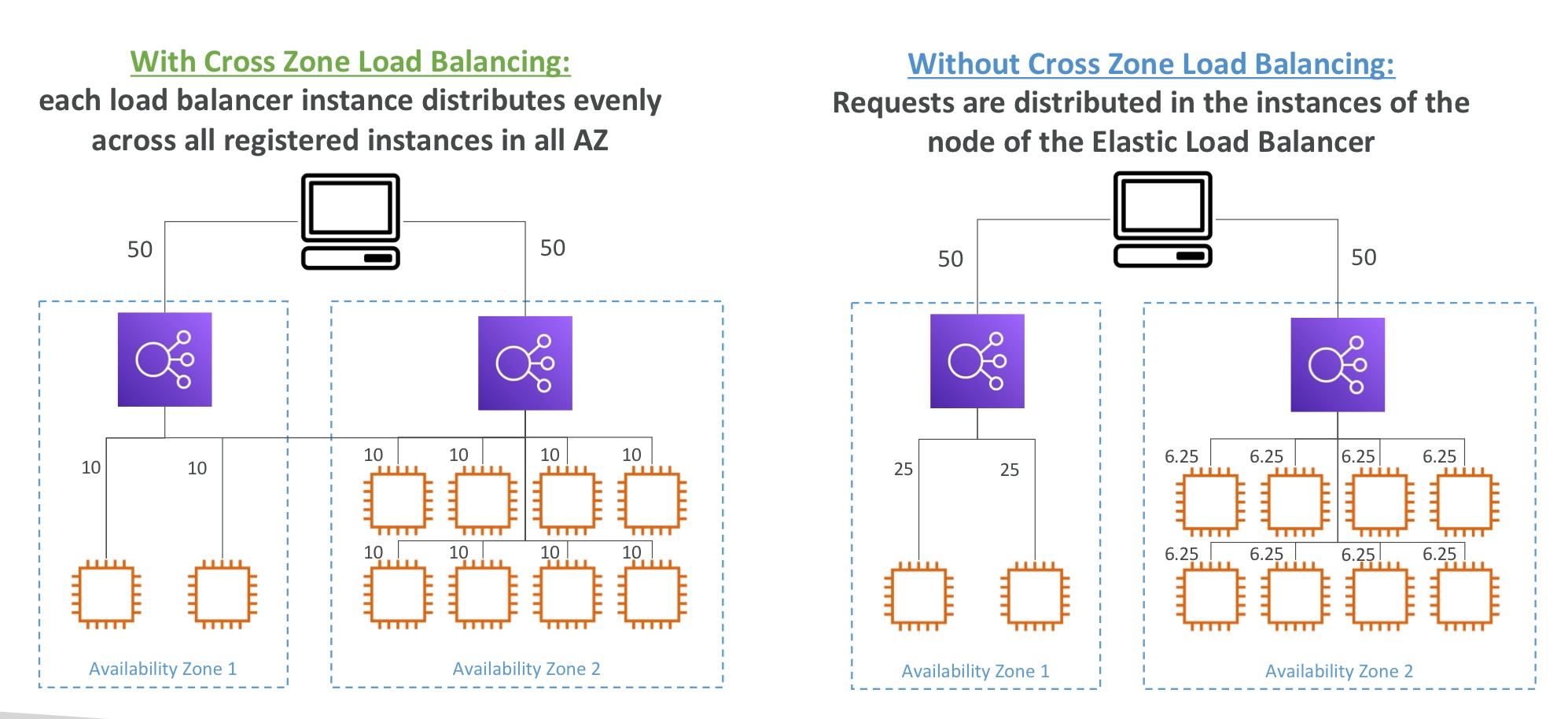
- Application Load Balancer
- Enabled by default
- No charges for inter AZ data
- Network Load Balancer & Gateway Load Balancer
- Disabled by default
- pay charges for inter AZ data if enabled
- Classic Load Balancer
- diabled by default
- no charges for inter AZ data if enabled
SSL/TLS - Basics
- An SSL Certificate allows traffic between clients and load balancer to be encrypted in transit
- SSL - Secure Sockets Layer
- for encrypt connection
- public ssl -> issued by Certificate Authorities
- have an expiration date, must be renewed
- load balancer uses an X.509 certificate
- mange certificates using ACM (AWS Certificate Manger)
- ACM에 사용자 지정 인증서 업로드 가능
- HTTPS listener:
- must specify a default certificate
- can add an optional list of certs to support multiple domains
- clients can use SNI(Server Name Indication) to specify the hostname they reach
- ability to specify a security policy to support older versions of SSL/TLS
- TLS - Transport Layer Security
- newer version
- TLS certificates are mainly used, but people still refer as SSL
SSL - Server Name Indication
- solves the problem of loading multiple SSL certificates onto one web server
- newer protocol, and requires the client to indicate the hostname of the target server in the initial SSL handshake
- server will then find the correct certificate, or return the default one
Elastic Load Balancers - SSL Certificates
- Classic Load Balancer
- support only one SSL certificate
- must use multiple CLB for multiple hostname with multiple SSL certificates
- Application Load Balancer
- supports multiple listeners with multiple SSL certificates
- uses SNI to make it work
- Network Load Balancer
- supports multiple listeners with multiple SSL certificates
- uses SNI to make it work
Connection Draining
- Feature naming
- CLB : connection draining
- ALB & NLB : deregistration delay
- 인스턴스가 de-registering or unhealthy 상태에 있을 때 in-flight 요청
- EC2 인스턴스가 de-registering 상태 일 때 새로운 요청을 보내지 않도록 함
- 1 to 3600초
- can be disabled
- set to a low value if requests are short
Auto Scaling
- aws의 장점 중 하나 : 유연성이 높음
- 인스턴스의 증감을 자동으로 실행
- 서버의 액세스 상태에 따라 서버 대수를 늘리거나 줄이는 기능
- AWS는 auto scaling을 단독으로 사용할 뿐만 아니라 cloudwatch에서 서버의 부하 정보 (cpu 부하, 네트워크 통신량 등) 데이터를 참조하여 스케일링에 참고할 수 있음
- Auto Scaling을 시작하려면 그룹이 필요함 (인스턴스의 집합)
- 그 그룹에 인스턴스(서버)의 최소 대수와 최대 대수를 설정해야 함
- 범위 안에서 인스턴스의 수가 증감
- (1) EC2 인스턴스가 정지한 경우 분리하고 새로운 EC2 인스턴스 생성
- (2) 일정에 맞춰 스케일링하기
- (3) CPU와 네트워크의 부하를 참고, 특정 임계 값을 넘을 때 인스턴스 수를 자동적으로 증감
- 서버 시작에 필요한 AMI와 키 페어, 보안 그룹등을 설정해야 함
Auto Scaling - Cloudwatch Alarms & Scaling
- possible to scale an ASG based on CloudWatch alarms
- an alarm monitors a metric
- average cpu
- custom metrics
- based on the alarm
- create scale-out polices (increase the number of instances)
- create scale-in polices(decrease the number of instances)
Auto Scaling - Polices
- Dynamic Scaling
- Target Tracking Scaling
- simple to set up
- 예시 ) 평균 ASG CPU가 40%대에 유지되도록 함
- Simple/Step Scaling
- 경보 트리거 발생시, 2 유닛 더하기, 1개 유닛 지우기 등
- Target Tracking Scaling
- Scheduled Scaling
- anticipate a scaling based on known usage patterns
- 예시 ) 매주 금요일 오전 10시부터 5시까지는 최소 용량 증가
- Predictive Scaling
- continuously forecast load and schedule scaling ahead
- Good Metrics to Scale on
- CPU Utilization
- average cpu utilization across instances
- Request Count Per Target
- make sure the number of requests per EC2 instance is table
- Average Network In/Out
- Any Custom Metric
- CPU Utilization
- Scaling Cool Downs
- after a scaling activity happens, you are in the cooldown period( 300 seconds default )
- during the cool down period, the ASG will not launch or terminate additional instances
- use a ready-to-use AMI to reduce configuration time in order to be serving request fasters and reduce the cooldown period
'aws' 카테고리의 다른 글
| Elastic Beanstalk (0) | 2024.03.28 |
|---|---|
| RDS (1) | 2024.03.27 |
| EC2 Instance Storage (0) | 2024.03.24 |
| EC2 Associate (0) | 2024.03.24 |
| EC2 (0) | 2024.03.24 |